 PlayAzaan
How to use PlayAzaan
This guide shows you how to set up PlayAzaan on iPhone so the full adhan rings at every prayer time, and how to use each feature. Setup takes about two minutes. PlayAzaan for Android has the same features, though some screens look a little different.
Step 1
Choose where you pray
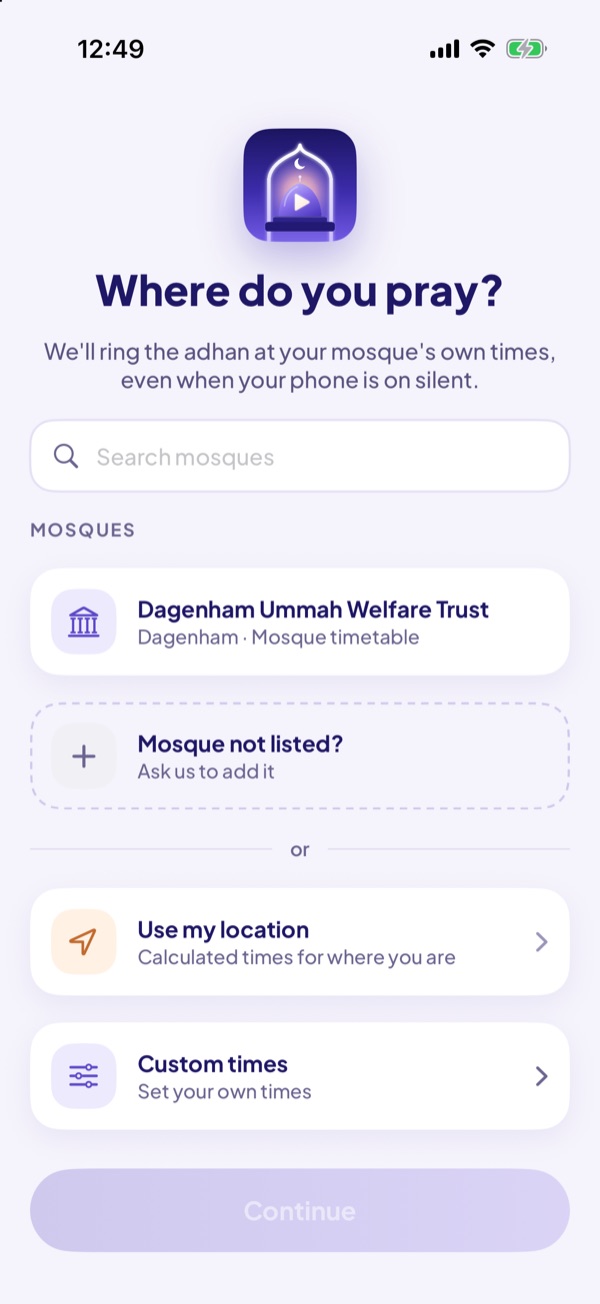
The first time you open PlayAzaan, it asks where you pray.
- Tap your mosque in the list, or type its name in Search mosques.
- Tap Continue.
If your mosque isn't listed, tap Mosque not listed? to ask us to add it. Until then, choose Use my location or Custom times. To learn more, see Change where your times come from.
Step 2
Allow alarms
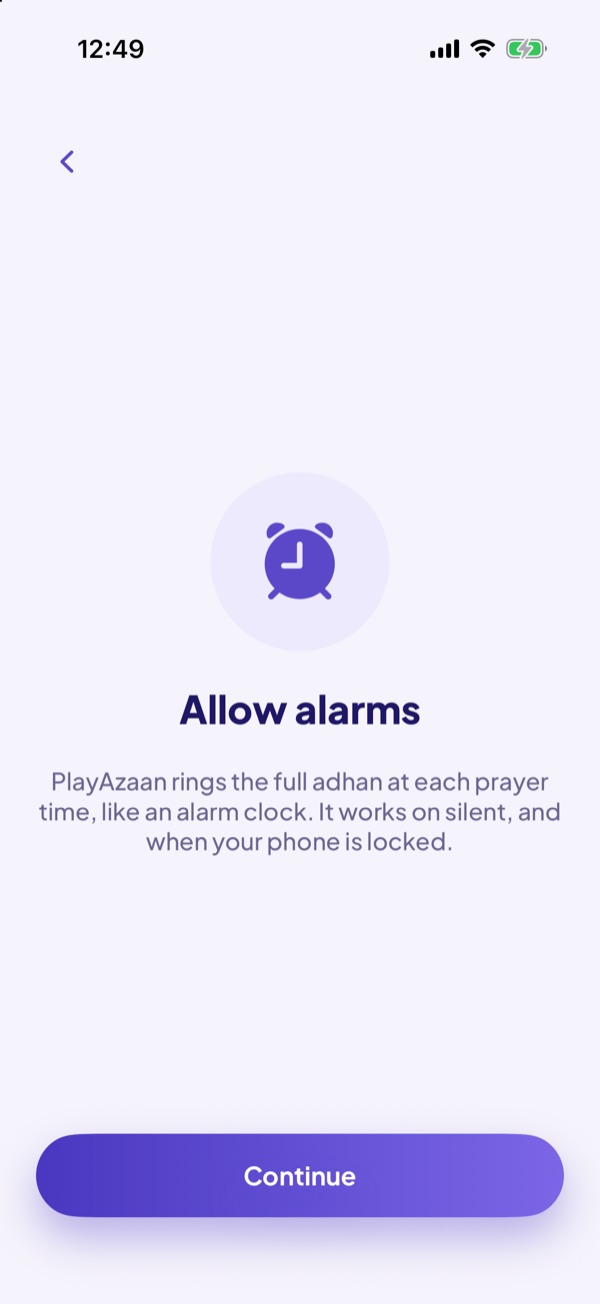
PlayAzaan rings the full adhan at each prayer time like an alarm clock. It works on silent, and when your phone is locked.
- Tap Continue.
- When iPhone asks to let PlayAzaan schedule alarms and timers, tap Allow.
PlayAzaan can't ring without this permission. If you tapped Don't Allow, turn alarms on for PlayAzaan in the iPhone Settings app.
Step 3
Read the home screen
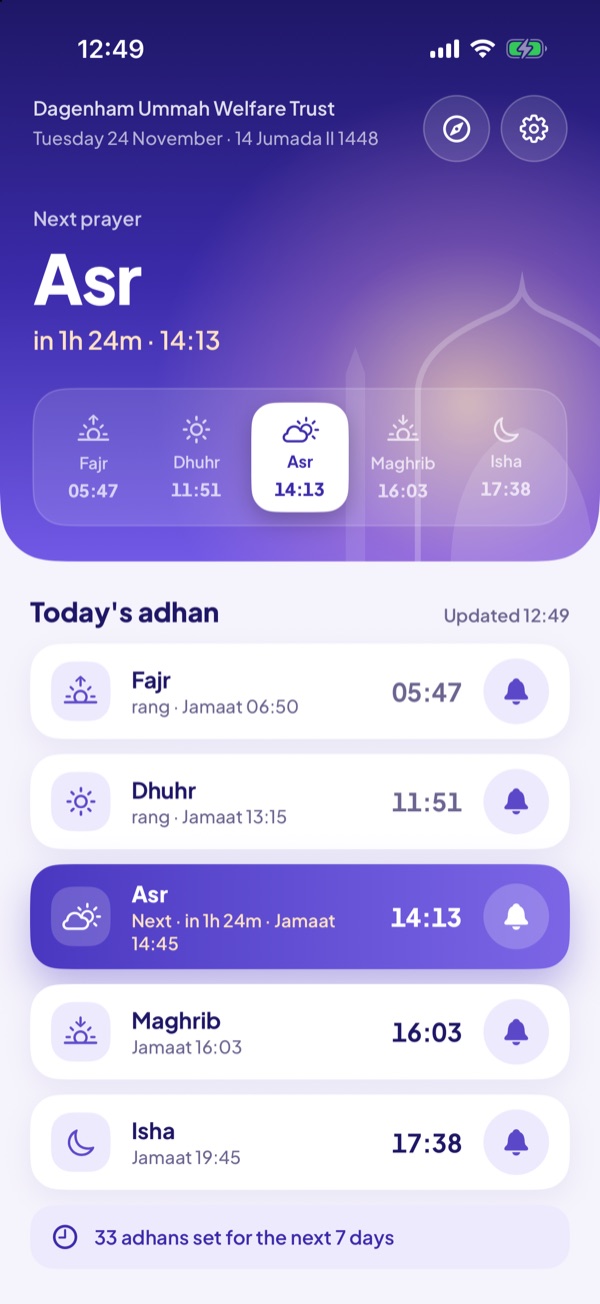
The home screen shows your day at a glance:
- The next prayer and a live countdown to it.
- Today's five prayer times.
- Your mosque's jamaat time under each prayer, when the mosque publishes one.
- How many adhans are set for the next 7 days.
PlayAzaan keeps the next 7 days of alarms set, so the adhan still rings if your phone is offline.
Step 4
Turn one adhan off
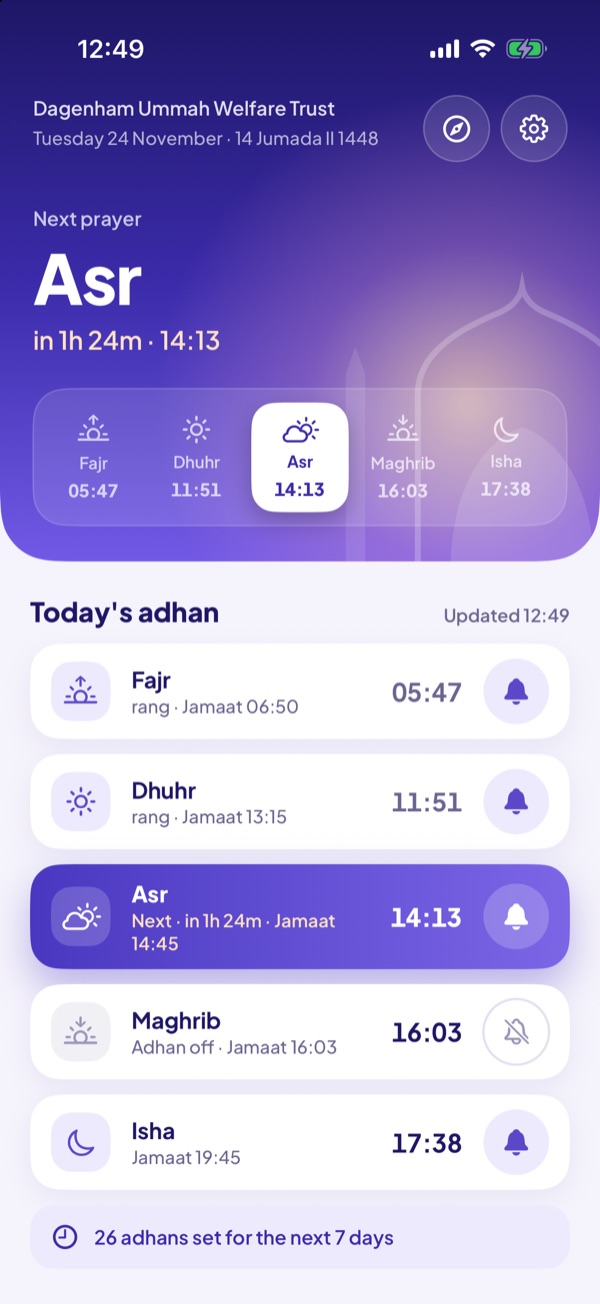
To silence the adhan for one prayer, tap the bell next to it. The prayer shows Adhan off, and PlayAzaan stops ringing for it every day until you turn it back on.
To turn it back on, tap the bell again.
Step 5
Find the Qibla
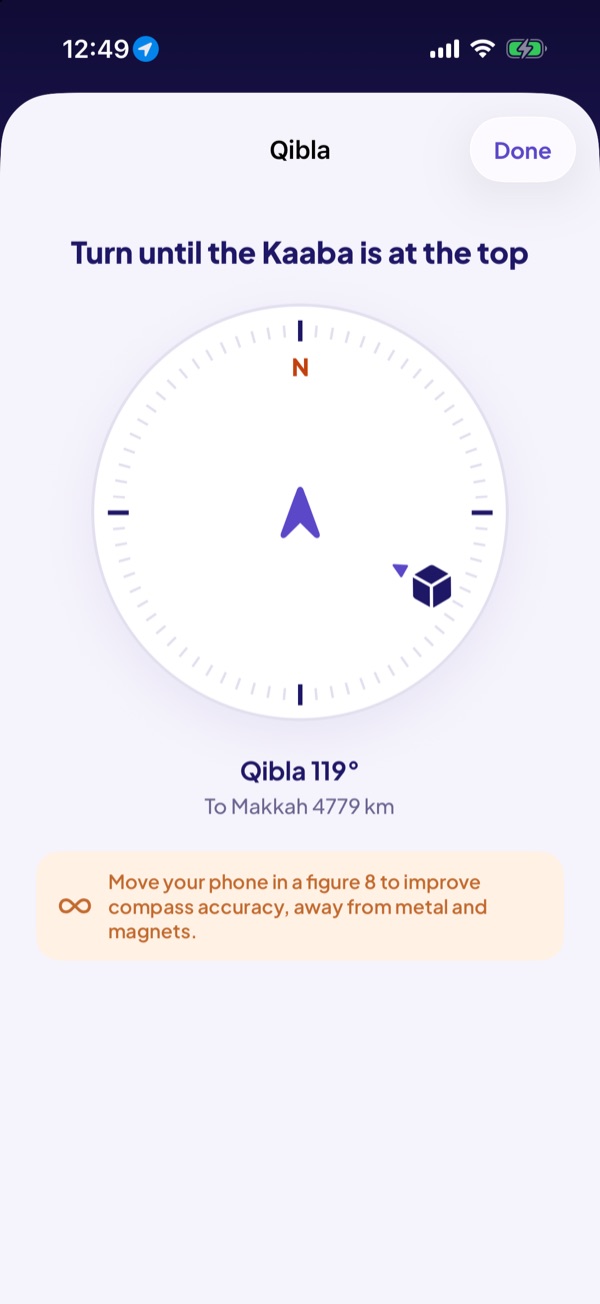
- On the home screen, tap the compass button at the top.
- The first time, tap Use my location. The direction is worked out on your phone, and your location isn't sent anywhere.
- Hold your phone flat and turn until the Kaaba is at the top.
If the compass looks wrong, move your phone in a figure 8, away from metal and magnets.
Step 6
Settings
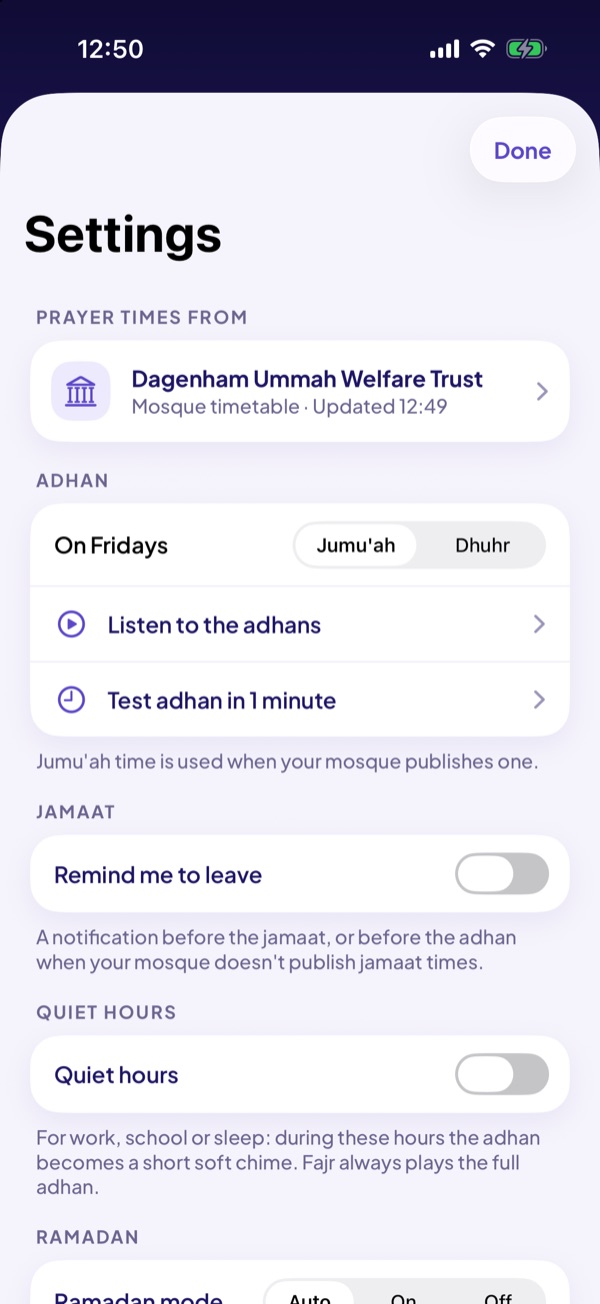
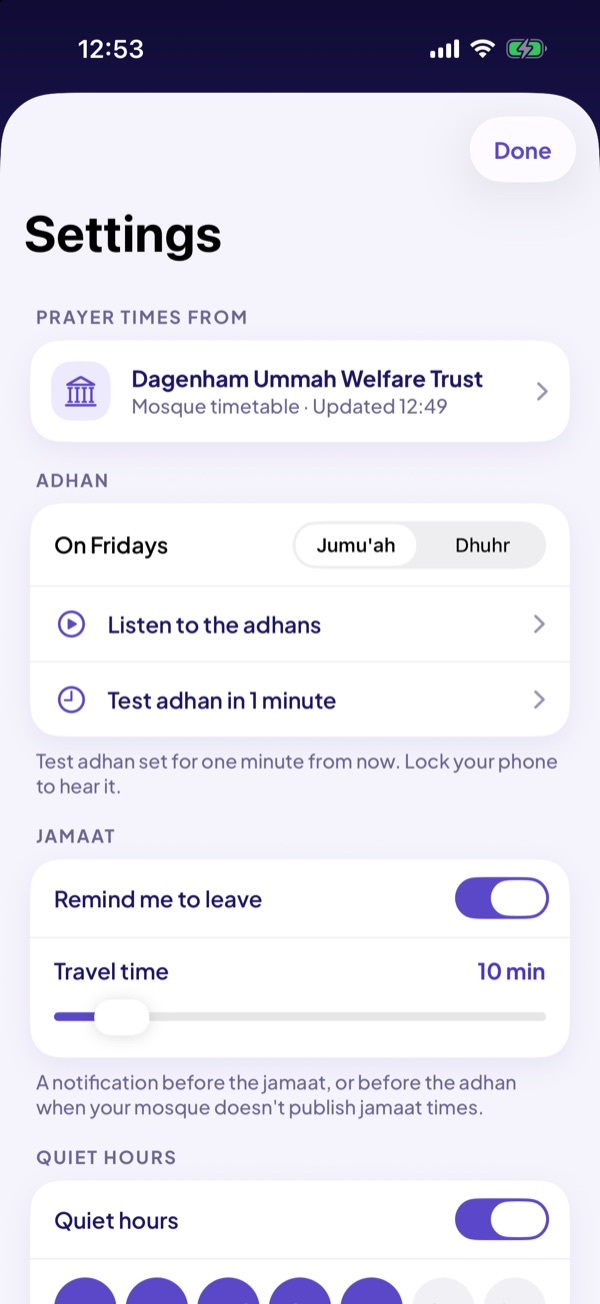
To open Settings, tap the gear button at the top of the home screen. At the top you can:
- Prayer times from: see where your times come from, and change it.
- On Fridays: choose whether the Dhuhr adhan follows your mosque's Jumu'ah time or the usual Dhuhr time. The Jumu'ah time is used when your mosque publishes one.
- Listen to the adhans: hear the recordings PlayAzaan uses.
- Test adhan in 1 minute: check that the adhan rings. See Test the adhan.
Step 7
Get a reminder to leave
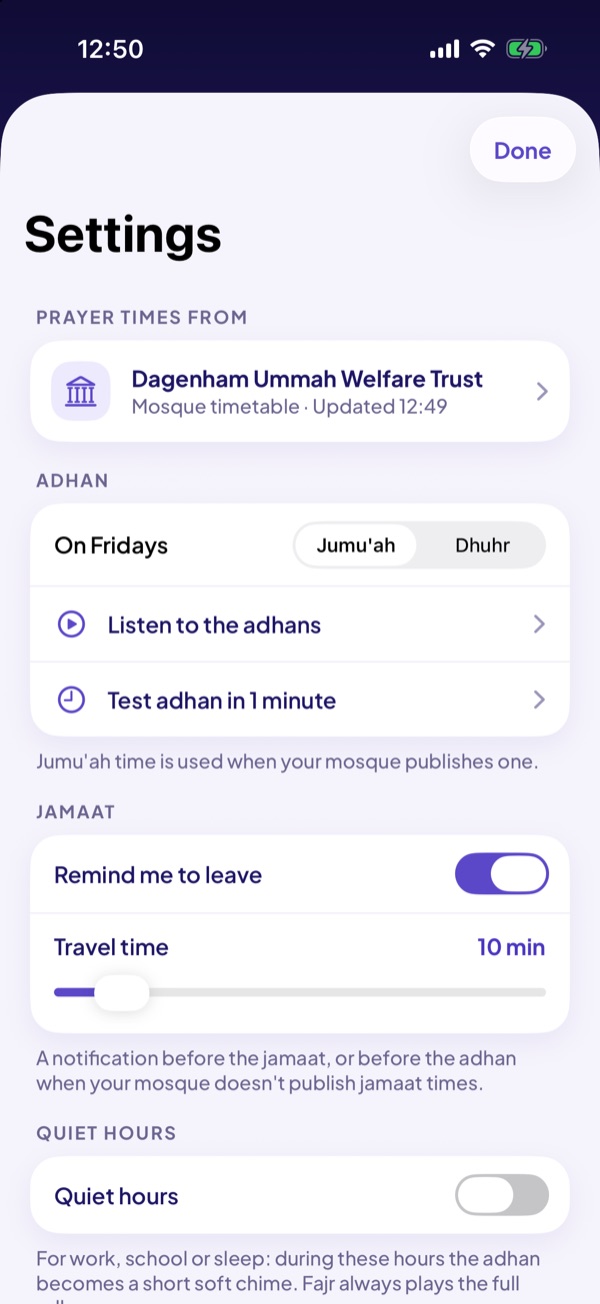
PlayAzaan can send a notification in time for you to reach the jamaat.
- In Settings, turn on Remind me to leave.
- If iPhone asks to let PlayAzaan send notifications, tap Allow.
- Drag Travel time to how long it takes you to get to the mosque.
The reminder comes before the jamaat. If your mosque doesn't publish jamaat times, it comes before the adhan.
Step 8
Set quiet hours
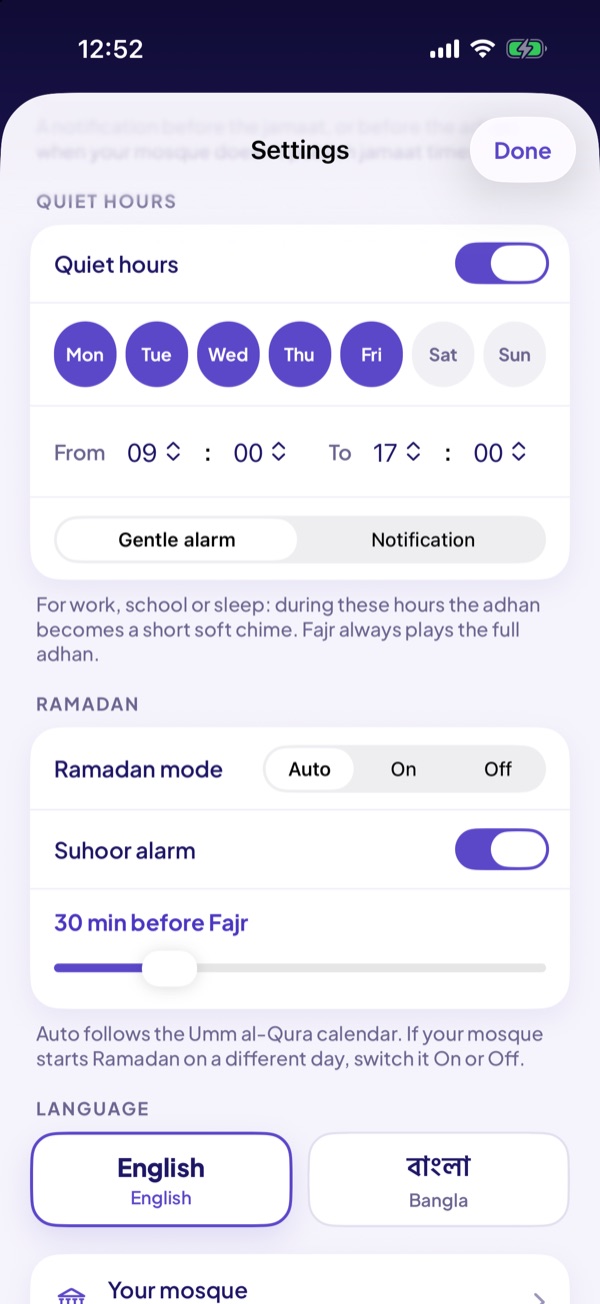
For work, school or sleep, quiet hours turn the adhan into a short, soft chime. Fajr always plays the full adhan.
- In Settings, turn on Quiet hours.
- Tap the days you want. Monday to Friday is selected at first.
- Set the From and To times.
- Choose Gentle alarm for a short chime, or Notification for a notification only.
Step 9
Ramadan and language
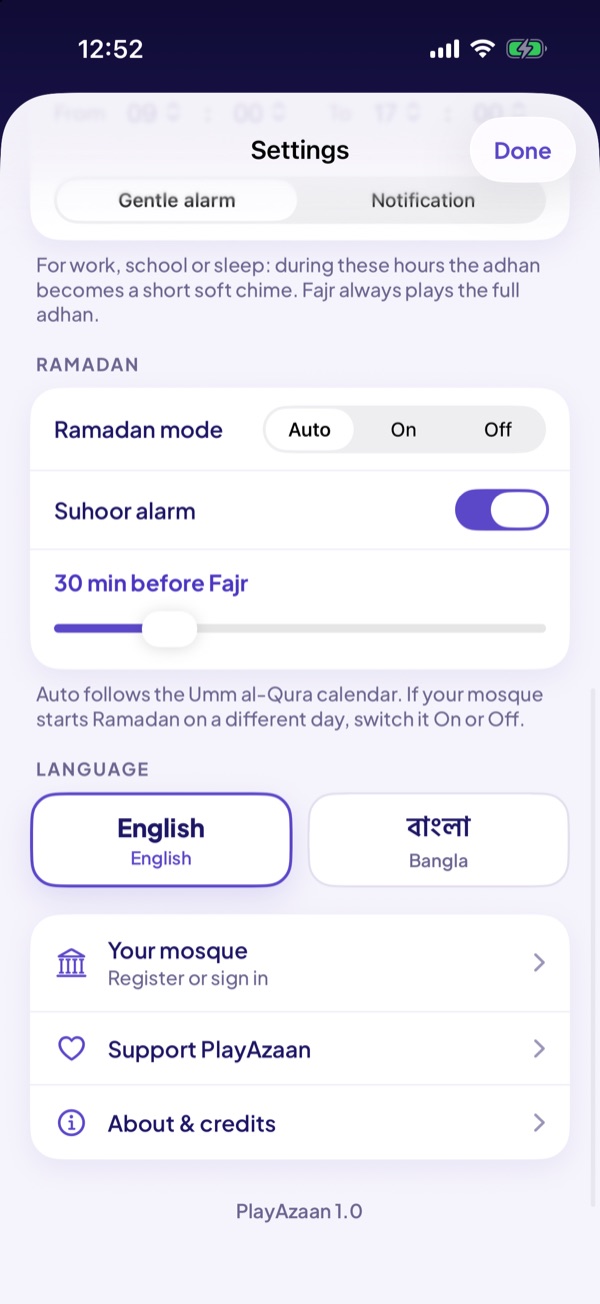
Ramadan mode adds a Suhoor alarm before Fajr and an Iftar countdown.
- Auto follows the Umm al-Qura calendar. If your mosque starts Ramadan on a different day, choose On or Off.
- Turn Suhoor alarm on or off, and drag the slider to choose how many minutes before Fajr it rings.
Under Language, choose English or বাংলা. The whole app and its widgets change language.
Step 10
Change where your times come from
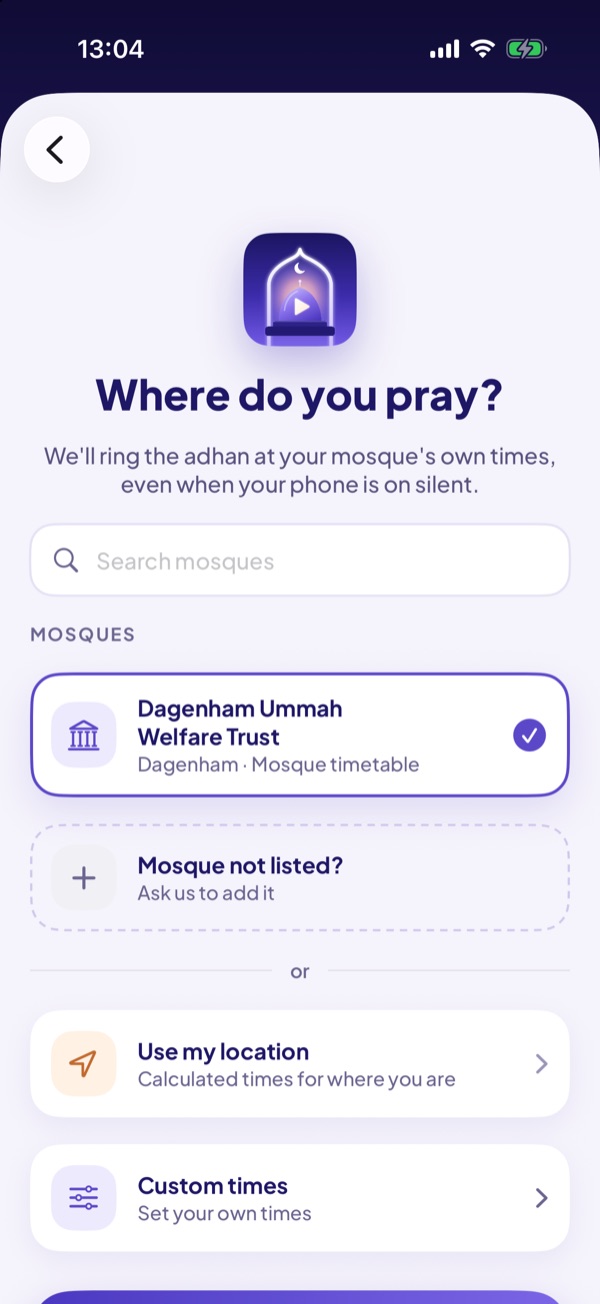
In Settings, tap the mosque under Prayer times from. Then choose one of these:
- A mosque: tap another mosque in the list.
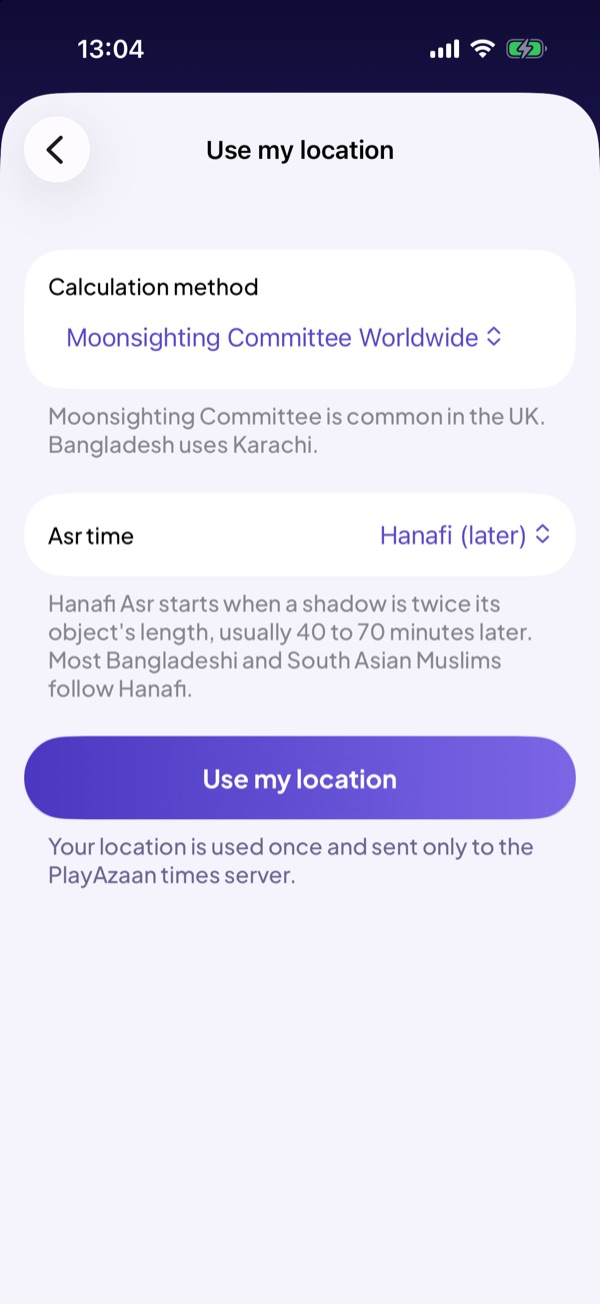
- Use my location: PlayAzaan calculates the times for where you are. Choose a Calculation method and an Asr time, then tap Use my location. Moonsighting Committee is common in the UK; Bangladesh uses Karachi. Most Bangladeshi and South Asian Muslims follow Hanafi for Asr.
- Custom times: see Set your own times.
Your location is rounded to about 1 km on your phone, used once, and sent only to the PlayAzaan times server.
Step 11
Set your own times
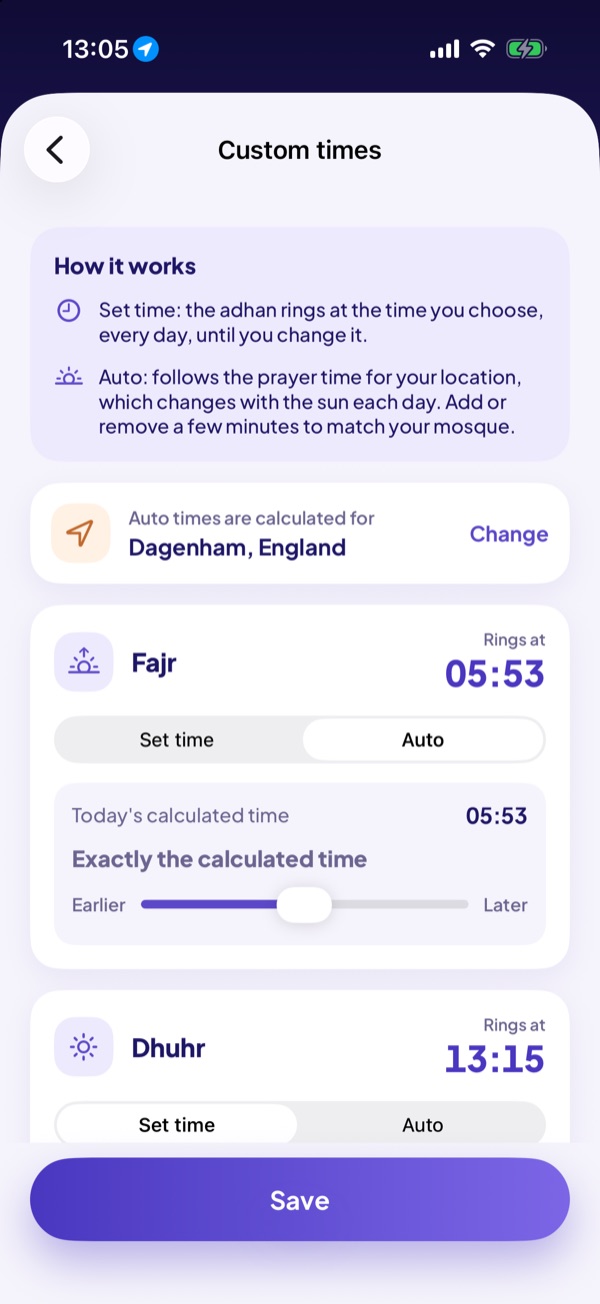
Choose Custom times to decide when each adhan rings. For each prayer, choose:
- Set time: the adhan rings at the time you choose, every day, until you change it.
- Auto: the adhan follows the calculated time for your location, which changes with the sun each day. Drag the slider towards Earlier or Later to match your mosque.
Auto times need a location. Tap Change to choose one, then tap Save. Custom times are stored only on your phone.
Step 12
For mosques
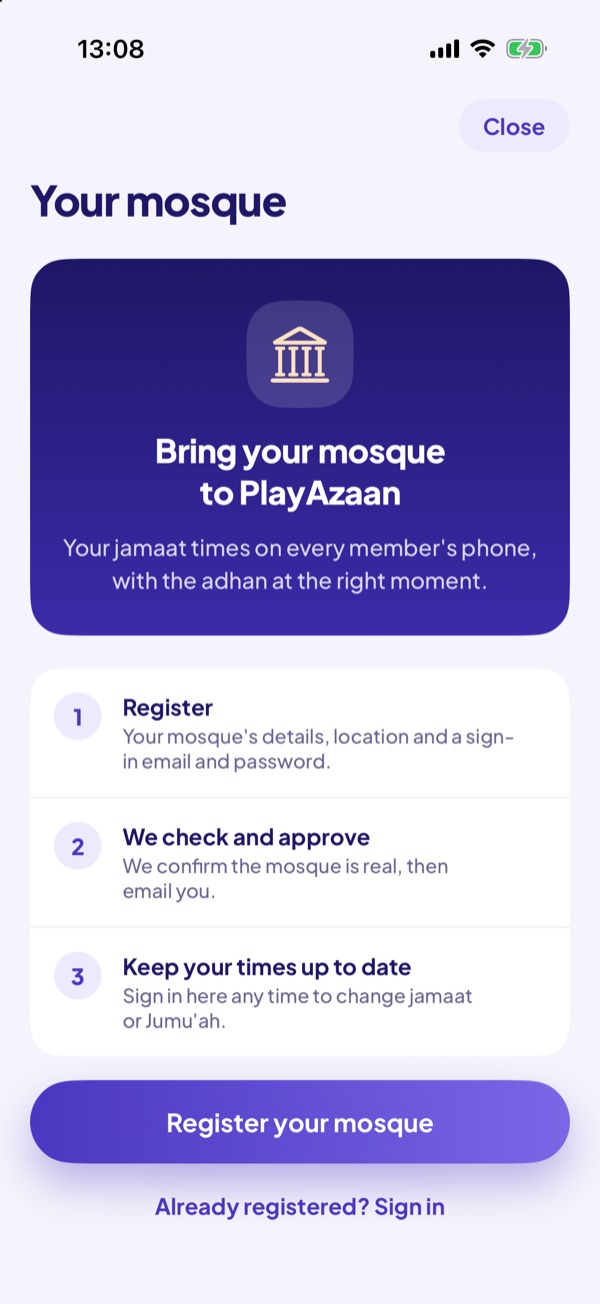
Mosques can put their own jamaat times on every member's phone.
- In Settings, tap Your mosque, then tap Register your mosque.
- Enter the mosque's details and location, and a sign-in email and password.
- We check that the mosque is real, approve it and email you.
- Sign in at any time to change jamaat or Jumu'ah times.
Already registered? Tap Already registered? Sign in. To delete a mosque account, see Delete your account.
Step 13
Test the adhan
Check that everything works before the next prayer.
- In Settings, tap Test adhan in 1 minute.
- Choose Regular adhan or Fajr adhan.
- Lock your phone. The adhan rings within a minute, even on silent.
When the adhan rings, tap Stop to stop it, or Play adhan to open PlayAzaan and hear the whole recording.
Add a widget
PlayAzaan's widgets show the next prayer and a live countdown on your Home Screen or Lock Screen.
- Touch and hold an empty part of the Home Screen until the apps jiggle.
- Tap Edit, then Add Widget.
- Search for PlayAzaan, choose a size, then tap Add Widget.
To add one to the Lock Screen, touch and hold the Lock Screen, tap Customise, choose the Lock Screen, then tap the widget area and choose PlayAzaan.
Questions and help
Does the adhan ring when my phone is on silent?
Yes. Each prayer is a real alarm, so it rings on silent and when your phone is locked.
Do I need the internet?
Only to download times. PlayAzaan saves the next 7 days, so the adhan keeps ringing for up to 7 days without a connection.
The adhan didn't ring. What should I check?
- Open Settings in PlayAzaan and tap Test adhan in 1 minute.
- Check that the bell for that prayer is on, on the home screen.
- Check that PlayAzaan is allowed to schedule alarms, in the iPhone Settings app.
My mosque's times look different
Choose your mosque in Prayer times from if it's listed. If it isn't, use custom times and move each prayer earlier or later to match.
Is PlayAzaan free?
Yes. There are no ads and no tracking. If you'd like to help keep it running, tap Support PlayAzaan in Settings to leave an optional one-time tip.
Still stuck? Email help@playazaan.app or see Support.